

Explore how to build a local Retrieval-Augmented Generation (RAG) agent using LLaMA3, a powerful language model from Meta. This RAG agent integrates several cutting-edge ideas from recent research to enhance its capabilities.
- Adaptive Routing (paper): Based on the Adaptive RAG paper, our agent intelligently routes questions to different retrieval approaches, leveraging the strengths of each method for optimal performance.
- Fallback to Web Search (paper): Inspired by the Corrective RAG paper, our agent falls back to web search if the retrieved documents are not relevant, ensuring comprehensive coverage.
- Self-Correction (paper): Incorporating concepts from the Self-RAG paper, our agent identifies and corrects hallucinations or incomplete answers.
We'll use LangGraph to build complex, multi-step workflows that involve language models and other components. By combining these research ideas, our agent will provide accurate and informative responses to challenging queries. This blog post expands on the work presented in Langchain-ai's notebook, illustrating how you can scale with cloud processing power. We will port the original notebook to utilize Amazon Bedrock for LLM inference to scale our embedding and text generation capabilities. The choice of vector stores (local chromaDB) will remain unchanged, and we will discover how to scale this part in future blog posts.
**A brief intro to Amazon Bedrock:**Amazon Bedrock is a fully managed service that offers a choice of high-performing foundation models (FMs) from leading AI companies like AI21 Labs, Anthropic, Cohere, Meta, Mistral AI, Stability AI, and Amazon through a single API, along with a broad set of capabilities you need to build generative AI applications with security, privacy, and responsible AI. Using Amazon Bedrock, you can easily experiment with and evaluate top FMs for your use case, privately customize them with your data using techniques such as fine-tuning and Retrieval Augmented Generation (RAG), and build agents that execute tasks using your enterprise systems and data sources. Since Amazon Bedrock is serverless, you don't have to manage any infrastructure, and you can securely integrate and deploy generative AI capabilities into your applications using the AWS services you are already familiar with.
Get started by setting up the environment and installing the required dependencies. We'll walk through the step-by-step process of building the RAG agent, covering document retrieval, question routing, answer generation, and self-correction mechanisms. Code examples and detailed explanations will be provided to ensure a smooth learning experience. By the end, you'll have a solid understanding of how to build a sophisticated RAG agent tailored to your specific use case.
Let's dive into the exciting world of RAG agents powered by LLaMA3 and cutting-edge research!
First, we need to install some libraries if we do not have them.
! pip install -U langchain_community tiktoken chromadb langchain langgraph tavily-python langchain-aws
Setting Up LangSmith Tracing
LangSmith is a powerful tracing tool that allows you to monitor and debug LangChain-based applications. Setting up a connection to LangSmith in this notebook will give us valuable insights into the inner workings of our RAG agent.
To enable tracing, set the LANGCHAIN_TRACING_V2 environment variable to "true". Then specify the LANGCHAIN_ENDPOINT and LANGCHAIN_API_KEY with the appropriate values for your LangSmith account. If you don't have an account, sign up at LangSmith Signup and obtain your API key.
If you are looking for a self-hosted alternative to LangSmith, check out Langfuse.
Furthermore, we will set our keys to connect to the AWS cloud.
If you work on an AWS resource, like Amazon SageMaker, your Execution Role already has the default connection set for you. To give you a broad place to play with the tech, find below a method for Google Colab as well as your local computer (with [AWS CLI](https://docs.aws.amazon.com/cli/latest/userguide/cli-chap-configure.html) setup through the aws configure command).
import os
Tracing allows LangSmith to monitor and record the execution of our LangChain components. This is incredibly useful for understanding how the different elements interact, identifying potential bottlenecks or issues, and optimizing the overall performance of our RAG agent.
As you build the agent, you can use LangSmith's insights to make adjustments and ensure it functions as intended.
Verifying ChromaDB Installation
Before we proceed with building our RAG agent, it's crucial to ensure that the ChromaDB library is installed and ready to use. ChromaDB is a vector database that we'll use for efficient document storage and retrieval.
ChromaDB will serve as the backbone of our document retrieval system, allowing us to store and retrieve relevant documents based on vector similarity. By checking its installation status, we can confirm that our development environment is set up correctly and ready for the next steps.
We deliberately did not change the local vector store to keep the notebook as accessible as possible.
!pip show chromadb
Creating a Bedrock Runtime Client
We'll create a Bedrock runtime client to connect to the Amazon Bedrock service. Bedrock, a fully managed service by AWS, allows developers to build and deploy generative AI models like large language models (LLMs). This client will enable us to leverage pre-trained LLMs from Amazon, such as the powerful LLaMA3 model from Meta.
Connecting to Bedrock is crucial for building our scalable and secure RAG agent, as it provides the necessary language model for generation capabilities. With the Bedrock runtime client in place, we can integrate LLaMA3 into our workflow and use its advanced natural language processing capabilities to generate accurate responses.
import boto3
import json, re

# Create a bedrock runtime client in us-west-2
bedrock_rt = boto3.client("bedrock-runtime",
                          region_name=aws_region,
                          aws_access_key_id=aws_access_key_id,
                          aws_secret_access_key=aws_secret_access_key,
)
If you use short-term credentials, make sure to include the tokens in the call to initialize the boto3.client.
# bedrock_rt = boto3.client("bedrock-runtime",
#                         region_name=aws_region, #e.g. us-west-2
#                         aws_access_key_id=aws_access_key_id,
#                         aws_secret_access_key=<aws_secret_access_key,
#                         aws_session_token=<YOUR SESSION TOKEN>)
For a primer on authentication with AWS boto3, check out the following documentation.
Amazon Bedrock with LangChain
After we have established a connection to the Amazon Bedrock service by creating a Bedrock runtime client, we can now connect the client to the LangChain Embeddings.
Bedrock provides a variety of models that we can choose from; please see a list of selected options below (current state in us-west-2 @ 17th May 2024)
from langchain_community.embeddings import BedrockEmbeddings

# Choose from a set of embedding models hosted on Amazon Bedrock
# Provider  | Model Name                        | Model ID
# -------------------------------------------------------------------------------
# Amazon    | Titan Embeddings G1 - Text 1.x   | amazon.titan-embed-text-v1
# Amazon    | Titan Embedding Text v2 1.x       | amazon.titan-embed-text-v2:0
# Cohere    | Embed English 3.x                 | cohere.embed-english-v3
# Cohere   | Embed Multilingual 3.x           | cohere.embed-multilingual-v3
embedding_model_id = "amazon.titan-embed-text-v2:0"
embeddings = BedrockEmbeddings(client=bedrock_rt, model_id=embedding_model_id)
vector = embeddings.embed_documents(
    ["This is a content of the document", "This is another document"]
)
Let's inspect the first part of the vector we got for the sentence "This is a content of the document", as well as the embedding dimension.
print(vector[0][:50])
print(len(vector[0]))
[-0.07963294, 0.022934286, 0.035994086, -0.004260362, 0.005773388, -0.0063308184, 0.031534642, -0.017678512, 0.034082897, 0.024049146, -0.028030794, 0.071669646, 0.026278868, -0.004519169, -0.023252817, 0.057654247, -0.041409127, 0.027234465, 0.03169391, 0.041090596, 0.07740321, 0.025960337, -0.020545298, 0.01951007, -0.04172766, -0.022137957, 4.9770583e-06, 0.01003375, 0.02388988, -0.022297222, 0.038701605, 0.050646547, 0.0033644915, -0.072625235, 0.0793144, 0.110849045, 0.066573136, -0.0055743055, -0.01274127, -0.021341627, 0.012582004, -0.015130258, -0.0033445833, 0.023252817, 0.030260516, 0.048416823, 0.023252817, 0.022934286, 0.07230671, 0.008321642]
1024
Setting Up a Document Retrieval System with ChromaDB
To build our Retrieval Augmented Generation (RAG) agent, we start by setting up a document retrieval system using ChromaDB, a robust local vector database.
We'll first load a set of URLs related to LLM agents, prompt engineering, and adversarial attacks. These documents form our initial knowledge corpus. For simplicity, we use a limited number of URLs here, but in a real-world scenario, you would include a comprehensive set of documents relevant to your use case.
Next, we define a custom embedding function called MyEmbeddingFunction using BedrockEmbeddings from langchain_community. This function converts text documents into vector embeddings for efficient storage and retrieval in ChromaDB.
We then load and split the content from the URLs into smaller chunks using RecursiveCharacterTextSplitter. This improves retrieval accuracy by allowing the system to fetch relevant document portions rather than whole documents.
It shall be noted that the RecursiveCharacterTextSplitter is one of the simplest forms of chunking a document, and more sophisticated methods might yield a better result. Check out this medium post for a short but comprehensive overview.
With the document chunks and custom embedding function, we create a ChromaDB vector store called vectorstore. This store acts as our persistent storage for the document embeddings, enabling fast and efficient retrieval based on vector similarity.
Finally, we create a retriever object from the vectorstore, which will fetch relevant documents based on user queries. This retriever is critical for our RAG agent, as it fetches the most relevant information for generating accurate and informative responses.
By setting up this document retrieval system, we are preparing our RAG agent to effectively utilize external knowledge sources and provide context-aware responses to user queries.
Defining a Custom Embedding Function with BedrockEmbeddings
As the landscape of Generative AI is advancing at unprecedented speeds, we often are left with a package that does not support our favorite model provider. In our case, chromaDB does not support Amazon Bedrock at the time of writing. However, we simply need to adapt the base EmbeddingFunction class of chromaDB to get it to work.
We utilize BedrockEmbeddings from the langchain_community library to create a custom embedding function.
The custom class MyEmbeddingFunction inherits from EmbeddingFunction provided by ChromaDB and includes methods embed_query and embed_documents. These methods convert queries and documents into vector embeddings using Bedrock Embedding models so we can later match the query with the document vectors.
By implementing this custom embedding function, we ensure seamless integration of Bedrock Embeddings into our document retrieval system, enhancing our RAG agent's ability to retrieve relevant documents based on vector similarity.
from chromadb import Documents, EmbeddingFunction, Embeddings
Setting Up the Document Retrieval System with ChromaDB
First, load a set of URLs related to LLM agents, prompt engineering, and adversarial attacks. These URLs serve as our initial corpus.
Load the content from the URLs and split documents into smaller chunks using RecursiveCharacterTextSplitter. This improves retrieval by allowing relevant document portions rather than entire documents.
Create a ChromaDB vector store called vectorstore to store document embeddings. Generate a retriever from the vector store to fetch relevant documents based on user queries.
from langchain.text_splitter import RecursiveCharacterTextSplitter
from langchain_community.document_loaders import WebBaseLoader
from langchain_community.vectorstores import Chroma

urls = [
    "https://lilianweng.github.io/posts/2023-06-23-agent/",
    "https://lilianweng.github.io/posts/2023-03-15-prompt-engineering/",
    "https://lilianweng.github.io/posts/2023-10-25-adv-attack-llm/",
]
docs = [WebBaseLoader(url).load() for url in urls]
docs_list = [item for sublist in docs for item in sublist]
text_splitter = RecursiveCharacterTextSplitter.from_tiktoken_encoder(
    chunk_size=250, chunk_overlap=0.2
)
doc_splits = text_splitter.split_documents(docs_list)

embedding_function = MyEmbeddingFunction(client = bedrock_rt,
                                         region_name=aws_region,
                                         model_id=embedding_model_id)
# Add to vectorDB
vectorstore = Chroma.from_documents(
    documents=doc_splits,
    embedding=embedding_function,
    collection_name="rag-chroma",
)
retriever = vectorstore.as_retriever()
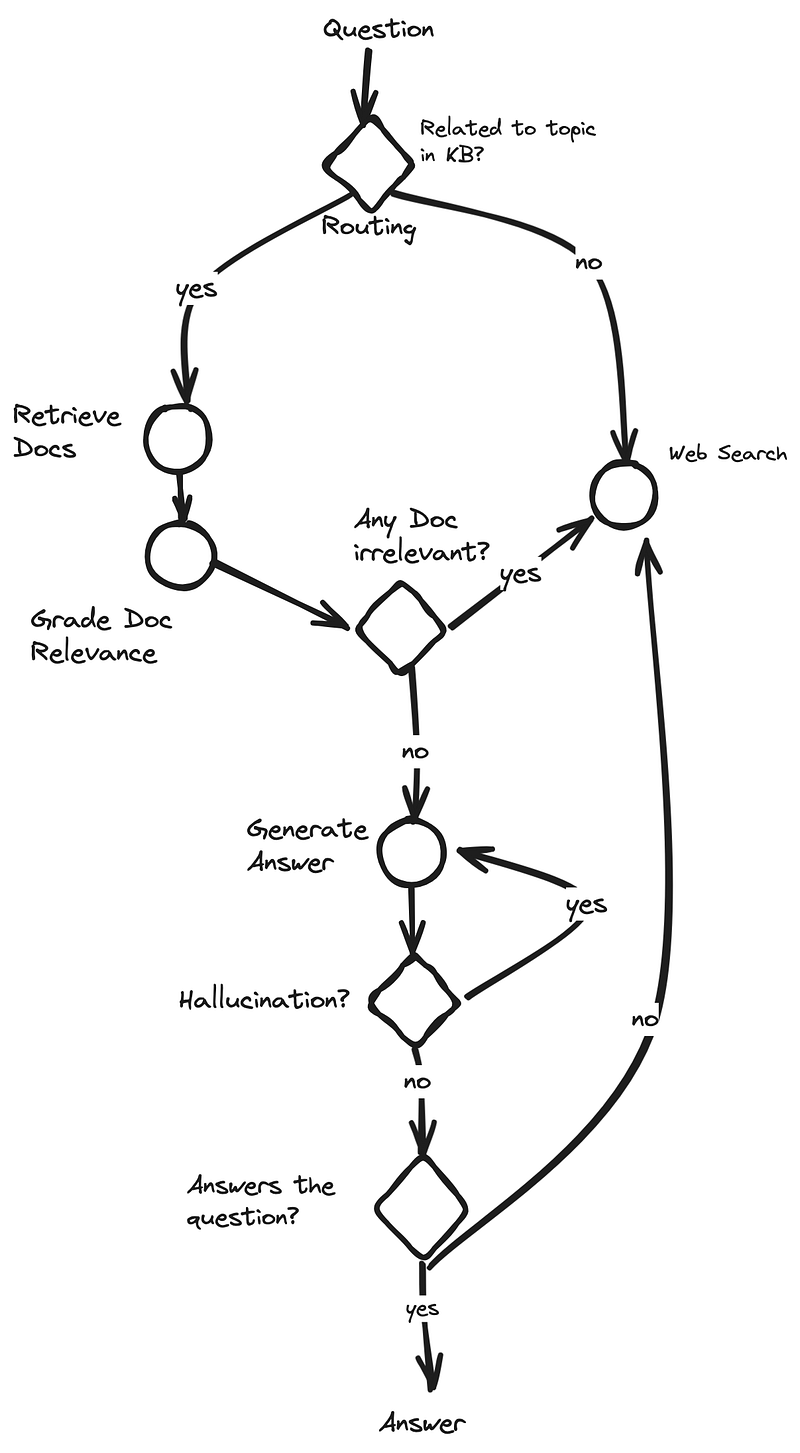
The Graph we are building with LangGraph
Before we start, we want to give a good understanding of the graph we want to build with LangGraph:
Implementing the Retrieval Grader
The "retrieval grader" is crucial for ensuring the relevance of retrieved documents to the user's question. It filters out irrelevant or erroneous results before generating an answer.
This grader uses a language model (LLM) and a prompt template. The prompt instructs the LLM to decide if a document contains keywords related to the user's question, providing a binary 'yes' or 'no' score in JSON format.
We define the prompt using PromptTemplate from LangChain, which dynamically includes the user's question and retrieved document. ChatBedrock, leveraging Meta's LLaMA3 model via Amazon Bedrock, performs the grading task.
To test, provide a sample question and use the retriever to get a document, then invoke the retrieval_grader to get the binary score.
By incorporating this grader, we ensure that only relevant documents are considered for answer generation, improving the overall response quality.
### Retrieval Grader
from langchain.prompts import PromptTemplate
from langchain_aws import ChatBedrock
from langchain_core.output_parsers import JsonOutputParser

llm = ChatBedrock(
    client = bedrock_rt,
    model_id="meta.llama3-70b-instruct-v1:0",
    model_kwargs={"temperature": 0.0},
)

prompt = PromptTemplate(
    template="""<|begin_of_text|><|start_header_id|>system<|end_header_id|> You are a grader assessing relevance
    of a retrieved document to a user question. If the document contains keywords related to the user question,
    grade it as relevant. It does not need to be a stringent test. The goal is to filter out erroneous retrievals. \n
    Give a binary score 'yes' or 'no' score to indicate whether the document is relevant to the question. \n
    Provide the binary score as a JSON with a single key 'score' and no premable or explaination.
     <|eot_id|><|start_header_id|>user<|end_header_id|>
    Here is the retrieved document: \n\n {document} \n\n
    Here is the user question: {question} \n <|eot_id|><|start_header_id|>assistant<|end_header_id|>
    """,
    input_variables=["question", "document"],
)

retrieval_grader = prompt | llm | JsonOutputParser()
question = "agent memory"
docs = retriever.invoke(question)
doc_txt = docs[1].page_content
print(retrieval_grader.invoke({"question": question, "document": doc_txt}))
{'score': 'yes'}
Building the Control Flow with LangGraph
LangGraph allows us to define a graph-based workflow for our RAG agent, integrating document retrieval, question routing, answer generation, and self-correction into an efficient pipeline.
Key steps include:
- Question Routing: Deciding whether the question should go to the document retrieval system or a web search.
- Document Retrieval: Fetching relevant documents from the vector database.
- Document Grading: Evaluating the relevance of retrieved documents.
- Answer Generation: Generating an answer using the retrieved documents and the language model.
- Hallucination Grading: Ensuring the generated answer is grounded in the retrieved documents.
- Answer Grading: Checking the usefulness of the generated answer.
- Web Search: Supplement with a web search if necessary.
LangGraph lets us seamlessly integrate these steps into a modular, adaptable workflow, enhancing the agent's ability to handle diverse queries.
Generating Answers
Using PromptTemplate from LangChain, we create a prompt for the assistant to answer questions concisely, utilizing retrieved context.
The prompt converts the user's question and relevant documents into an input format for the language model. The resulting answer is processed and returned.
Here's the process:
- Define the prompt template.
- Format the documents as context.
- Chain the prompt, LLM, and output parser to generate the response.
By integrating this chain, the RAG agent generates accurate, concise answers based on the retrieved context.
### Generate
from langchain.prompts import PromptTemplate
from langchain_core.output_parsers import StrOutputParser

# Prompt
prompt = PromptTemplate(
    template="""<|begin_of_text|><|start_header_id|>system<|end_header_id|> You are an assistant for question-answering tasks.
    Use the following pieces of retrieved context to answer the question. If you don't know the answer, just say that you don't know.
    Use three sentences maximum and keep the answer concise <|eot_id|><|start_header_id|>user<|end_header_id|>
    Question: {question}
    Context: {context}
    Answer: <|eot_id|><|start_header_id|>assistant<|end_header_id|>""",
    input_variables=["question", "document"],
)

# Post-processing
def format_docs(docs):
    return "\n\n".join(doc.page_content for doc in docs)

# Chain
rag_chain = prompt | llm | StrOutputParser()
# Run
question = "agent memory"
docs = retriever.invoke(question)
generation = rag_chain.invoke({"context": docs, "question": question})
print(generation)
In the context of LLM-powered autonomous agents, memory refers to the processes used to acquire, store, retain, and later retrieve information. There are two main types of memory: short-term memory, which utilizes the models in-context learning, and long-term memory, which provides the capability to retain and recall information over extended periods, often by leveraging an external vector store and fast retrieval.
Setting Up the Hallucination Grader
To ensure that generated answers are grounded in retrieved documents, use a hallucination grader. This grader assesses whether the answer is supported by the provided facts.
Define a prompt using PromptTemplate to instruct the LLM to output a binary 'yes' or 'no' score in JSON, indicating if the answer is grounded in the documents.
Invoke the grader with the generated answer and documents to validate the accuracy.
Incorporating this grader helps maintain the factual accuracy of the RAG agent's responses, ensuring high-quality outputs.
from langchain.prompts import PromptTemplate
from langchain_core.output_parsers import JsonOutputParser

### Hallucination Grader

# Prompt
prompt = PromptTemplate(
    template=""" <|begin_of_text|><|start_header_id|>system<|end_header_id|> You are a grader assessing whether
    an answer is grounded in / supported by a set of facts. Give a binary score 'yes' or 'no' score to indicate
    whether the answer is grounded in / supported by a set of facts. Provide the binary score as a JSON with a
    single key 'score' and no preamble or explanation. <|eot_id|><|start_header_id|>user<|end_header_id|>
    Here are the facts:
    \n ------- \n
    {documents}
    \n ------- \n
    Here is the answer: {generation}  <|eot_id|><|start_header_id|>assistant<|end_header_id|>""",
    input_variables=["generation", "documents"],
)
hallucination_grader = prompt | llm | JsonOutputParser()
hallucination_grader.invoke({"documents": docs, "generation": generation})
{'score': 'yes'}
Establishing the Answer Grader
To ensure answers are helpful and resolve the user's question, use an answer grader.
Define a prompt with PromptTemplate that directs the LLM to output a binary 'yes' or 'no' score, indicating the answer's usefulness.
Invoke the grader with the generated answer and user question to validate the relevance.
This step ensures the RAG agent produces not only accurate but also helpful and relevant responses.
### Answer Grader

# Prompt
prompt = PromptTemplate(
    template="""<|begin_of_text|><|start_header_id|>system<|end_header_id|> You are a grader assessing whether an
    answer is useful to resolve a question. Give a binary score 'yes' or 'no' to indicate whether the answer is
    useful to resolve a question. Provide the binary score as a JSON with a single key 'score' and no preamble or explanation.
     <|eot_id|><|start_header_id|>user<|end_header_id|> Here is the answer:
    \n ------- \n
    {generation}
    \n ------- \n
    Here is the question: {question} <|eot_id|><|start_header_id|>assistant<|end_header_id|>""",
    input_variables=["generation", "question"],
)
answer_grader = prompt | llm | JsonOutputParser()
answer_grader.invoke({"question": question, "generation": generation})
{'score': 'yes'}
Creating the Router
The router decides whether to direct the question to document retrieval or perform a web search.
Use PromptTemplate to instruct the LLM to make this decision based on the question's relevance to predefined topics.
Invoke the router with the user question and route accordingly.
Efficient routing ensures the most appropriate and effective method is used for each question, optimizing the RAG agent's performance.
The following prompt template has the topics of the knowledge base hard coded. Ideally, we would add metadata fields containing the topic of each document that we add to our vector store to be able to dynamically expand the correct topics so that the router is up to date.
### Router

# Topics should be dynamically fetched and updated whenever a new topic gets put in the vector store
topics = ["LLM Agents, Prompt Engineering, Adversarial Attacks on LLMs"]

prompt = PromptTemplate(
    template=f"""<|begin_of_text|><|start_header_id|>system<|end_header_id|> You are an expert at routing a
    user question to a vectorstore or web search. Use the vectorstore for questions on the following topics: {', '.join(topics)}. You do not need to be stringent with the keywords
    in the question related to these topics. Otherwise, use web-search. Give a binary choice 'web_search'
    or 'vectorstore' based on the question. Return the a JSON with a single key 'datasource' and
    no premable or explaination. Question to route: {question} <|eot_id|><|start_header_id|>assistant<|end_header_id|>""",
    input_variables=["question"],
)
question_router = prompt | llm | JsonOutputParser()
question = "llm agent memory"
docs = retriever.get_relevant_documents(question)
doc_txt = docs[1].page_content
print(question_router.invoke({"question": question}))
{'datasource': 'vectorstore'}
Integrating Web Search with Tavily
Set up environmental variables for the Tavily API and initialize the TavilySearchResults tool.
When necessary, perform a web search to gather additional documents. Invoke the tool with the user query and append the results to the existing documents.
Integrating web search complements the document retrieval system, covering a broader range of information for generating responses.
### Search
os.environ["TAVILY_API_KEY"] = tavily_ai_api_key

from langchain_community.tools.tavily_search import TavilySearchResults

web_search_tool = TavilySearchResults(k=3)
At this point, it is worth mentioning that the LangChain Tavily Search tool is leaving out a lot of the power of Tavily-AI API.
In a future post, we will explore how to fully utilize the Tavily AI API search with query rewriting to be used by an Agent in conjunction with Amazon Bedrock Agents.
Defining the Control Flow with LangGraph Nodes and Edges
Implement nodes representing key actions: document retrieval, document grading, web search, and answer generation.
Define conditional edges for decision-making: route the question, decide on document relevance, and grade the generated answer.
Set up the workflow graph with entry points, nodes, and edges to ensure a logical progression through the RAG agent's steps.
from typing_extensions import TypedDict
from typing import List

### State
class GraphState(TypedDict):
    """
    Represents the state of our graph.
    Attributes:
        question: question
        generation: LLM generation
        web_search: whether to add search
        documents: list of documents
    """
    question: str
    generation: str
    web_search: str
    documents: List[str]

from langchain.schema import Document
### Nodes

def retrieve(state):
    """
    Retrieve documents from vectorstore
    Args:
        state (dict): The current graph state
    Returns:
        state (dict): New key added to state, documents, that contains retrieved documents
    """
    print("---RETRIEVE---")
    question = state["question"]
    # Retrieval
    documents = retriever.invoke(question)
    return {"documents": documents, "question": question}

def generate(state):
    """
    Generate answer using RAG on retrieved documents
    Args:
        state (dict): The current graph state
    Returns:
        state (dict): New key added to state, generation, that contains LLM generation
    """
    print("---GENERATE---")
    question = state["question"]
    documents = state["documents"]
    # RAG generation
    generation = rag_chain.invoke({"context": documents, "question": question})
    return {"documents": documents, "question": question, "generation": generation}

def grade_documents(state):
    """
    Determines whether the retrieved documents are relevant to the question
    If any document is not relevant, we will set a flag to run web search
    Args:
        state (dict): The current graph state
    Returns:
        state (dict): Filtered out irrelevant documents and updated web_search state
    """
    print("---CHECK DOCUMENT RELEVANCE TO QUESTION---")
    question = state["question"]
    documents = state["documents"]
    # Score each doc
    filtered_docs = []
    web_search = "No"
    for d in documents:
        score = retrieval_grader.invoke(
            {"question": question, "document": d.page_content}
        )
        grade = score["score"]
        # Document relevant
        if grade.lower() == "yes":
            print("---GRADE: DOCUMENT RELEVANT---")
            filtered_docs.append(d)
        # Document not relevant
        else:
            print("---GRADE: DOCUMENT NOT RELEVANT---")
            # We do not include the document in filtered_docs
            # We set a flag to indicate that we want to run web search
            web_search = "Yes"
            continue
    return {"documents": filtered_docs, "question": question, "web_search": web_search}

def web_search(state):
    """
    Web search based based on the question
    Args:
        state (dict): The current graph state
    Returns:
        state (dict): Appended web results to documents
    """
    print("---WEB SEARCH---")
    question = state["question"]
    documents = state["documents"]
    # Web search
    docs = web_search_tool.invoke({"query": question})
    web_results = "\n".join([d["content"] for d in docs])
    web_results = Document(page_content=web_results)
    if documents is not None:
        documents.append(web_results)
    else:
        documents = [web_results]
    return {"documents": documents, "question": question}

### Conditional edge

def route_question(state):
    """
    Route question to web search or RAG.
    Args:
        state (dict): The current graph state
    Returns:
        str: Next node to call
    """
    print("---ROUTE QUESTION---")
    question = state["question"]
    print(question)
    source = question_router.invoke({"question": question})
    print(source)
    print(source["datasource"])
    if source["datasource"] == "web_search":
        print("---ROUTE QUESTION TO WEB SEARCH---")
        return "websearch"
    elif source["datasource"] == "vectorstore":
        print("---ROUTE QUESTION TO RAG---")
        return "vectorstore"

def decide_to_generate(state):
    """
    Determines whether to generate an answer, or add web search
    Args:
        state (dict): The current graph state
    Returns:
        str: Binary decision for next node to call
    """
    print("---ASSESS GRADED DOCUMENTS---")
    question = state["question"]
    web_search = state["web_search"]
    filtered_documents = state["documents"]
    if web_search == "Yes":
        # All documents have been filtered check_relevance
        # We will re-generate a new query
        print(
            "---DECISION: ALL DOCUMENTS ARE NOT RELEVANT TO QUESTION, INCLUDE WEB SEARCH---"
        )
        return "websearch"
    else:
        # We have relevant documents, so generate answer
        print("---DECISION: GENERATE---")
        return "generate"

### Conditional edge

def grade_generation_v_documents_and_question(state):
    """
    Determines whether the generation is grounded in the document and answers question.
    Args:
        state (dict): The current graph state
    Returns:
        str: Decision for next node to call
    """
    print("---CHECK HALLUCINATIONS---")
    question = state["question"]
    documents = state["documents"]
    generation = state["generation"]
    score = hallucination_grader.invoke(
        {"documents": documents, "generation": generation}
    )
    grade = score["score"]
    # Check hallucination
    if grade == "yes":
        print("---DECISION: GENERATION IS GROUNDED IN DOCUMENTS---")
        # Check question-answering
        print("---GRADE GENERATION vs QUESTION---")
        score = answer_grader.invoke({"question": question, "generation": generation})
        grade = score["score"]
        if grade == "yes":
            print("---DECISION: GENERATION ADDRESSES QUESTION---")
            return "useful"
        else:
            print("---DECISION: GENERATION DOES NOT ADDRESS QUESTION---")
            return "not useful"
    else:
        pprint("---DECISION: GENERATION IS NOT GROUNDED IN DOCUMENTS, RE-TRY---")
        return "not supported"

from langgraph.graph import END, StateGraph
workflow = StateGraph(GraphState)
# Define the nodes
workflow.add_node("websearch", web_search)  # web search
workflow.add_node("retrieve", retrieve)  # retrieve
workflow.add_node("grade_documents", grade_documents)  # grade documents
workflow.add_node("generate", generate)  # generatae
Designing the control flow as a structured graph ensures a coherent and efficient pipeline for the RAG agent's operations.
# Build graph
workflow.set_conditional_entry_point(
    route_question,
    {
        "websearch": "websearch",
        "vectorstore": "retrieve",
    },
)

workflow.add_edge("retrieve", "grade_documents")
workflow.add_conditional_edges(
    "grade_documents",
    decide_to_generate,
    {
        "websearch": "websearch",
        "generate": "generate",
    },
)
workflow.add_edge("websearch", "generate")
workflow.add_conditional_edges(
    "generate",
    grade_generation_v_documents_and_question,
    {
        "not supported": "generate",
        "useful": END,
        "not useful": "websearch",
    },
)
Compiling and Testing the Workflow
Compile the LangGraph workflow and test it with sample inputs.
Provide questions to the compiled application and track the output through each step.
Debug and refine based on the results to ensure the RAG agent performs as expected and delivers accurate and relevant answers.
Compiling and iterative testing ensure the RAG agent meets quality and performance standards before deployment.
# Compile
app = workflow.compile()

# Test
from pprint import pprint
inputs = {"question": "What are the types of agent memory?"}
for output in app.stream(inputs):
    for key, value in output.items():
        pprint(f"Finished running: {key}:")
pprint(value["generation"])
---ROUTE QUESTION---
What are the types of agent memory?
{'datasource': 'vectorstore'}
vectorstore
---ROUTE QUESTION TO RAG---
---RETRIEVE---
'Finished running: retrieve:'
---CHECK DOCUMENT RELEVANCE TO QUESTION---
---GRADE: DOCUMENT RELEVANT---
---GRADE: DOCUMENT RELEVANT---
---GRADE: DOCUMENT RELEVANT---
---GRADE: DOCUMENT RELEVANT---
---ASSESS GRADED DOCUMENTS---
---DECISION: GENERATE---
'Finished running: grade_documents:'
---GENERATE---
---CHECK HALLUCINATIONS---
---DECISION: GENERATION IS GROUNDED IN DOCUMENTS---
---GRADE GENERATION vs QUESTION---
---DECISION: GENERATION ADDRESSES QUESTION---
'Finished running: generate:'
('The types of agent memory are: Sensory Memory, Short-term memory, and '
 'Long-term memory.')
Testing the WebSearch
For a test on the web search, we utilize the question, "Who are the Bears expected to draft first in the NFL draft?". As this request needs up-to-date information and should not be based on the knowledge base, we expect it to go directly to a web search.
# Compile
app = workflow.compile()

inputs = {"question": "Who are the Bears expected to draft first in the NFL draft?"}
for output in app.stream(inputs):
    for key, value in output.items():
        pprint(f"Finished running: {key}:")
pprint(value["generation"])
---ROUTE QUESTION---
Who are the Bears expected to draft first in the NFL draft?
{'datasource': 'vectorstore'}
vectorstore
---ROUTE QUESTION TO RAG---
---RETRIEVE---
'Finished running: retrieve:'
---CHECK DOCUMENT RELEVANCE TO QUESTION---
---GRADE: DOCUMENT NOT RELEVANT---
---GRADE: DOCUMENT NOT RELEVANT---
---GRADE: DOCUMENT NOT RELEVANT---
---GRADE: DOCUMENT NOT RELEVANT---
---ASSESS GRADED DOCUMENTS---
---DECISION: ALL DOCUMENTS ARE NOT RELEVANT TO QUESTION, INCLUDE WEB SEARCH---
'Finished running: grade_documents:'
---WEB SEARCH---
'Finished running: websearch:'
---GENERATE---
---CHECK HALLUCINATIONS---
---DECISION: GENERATION IS GROUNDED IN DOCUMENTS---
---GRADE GENERATION vs QUESTION---
---DECISION: GENERATION ADDRESSES QUESTION---
'Finished running: generate:'
('The Bears are expected to draft USC quarterback Caleb Williams with the No. '
 '1 pick in the 2024 NFL Draft. This is according to multiple reports and '
 'projections. Williams was widely considered the top prospect in a draft '
 'class loaded with talented quarterbacks.')
Further Improvements
If you look to improve the above code further, here are a few suggestions:
- Expand the Web Search Capabilities Currently, the web search capabilities only use the Tavily-AI Langchain tool, although Tavily AI has much more functionality to offer. You can, for example, include and exclude certain domains and websites, add the current date to target a specific timeframe of the results, and include a generic search on Google or DuckDuckGo to complement the Tavily-AI search.
- Retrieve the topics dynamically We hard-code the topics represented in our knowledge base. If we know the topics ahead of time, this is a perfectly valid approach. However, for more fine-grained retrieval, we should consider including vector metadata in our vector store.
- Change the knowledge base to a more scaleable option As the chromaDB vector store is running on our local instance, we have a scalability limit that is imposed upon us. We can use products like Pinecone or Amazon OpenSearch, just to name a few.